AI-video production guide
Prompt prose is not production direction.
A useful AI-video brief separates six decisions the model would otherwise have to guess: camera, motion, timing, framing, continuity and negative direction.
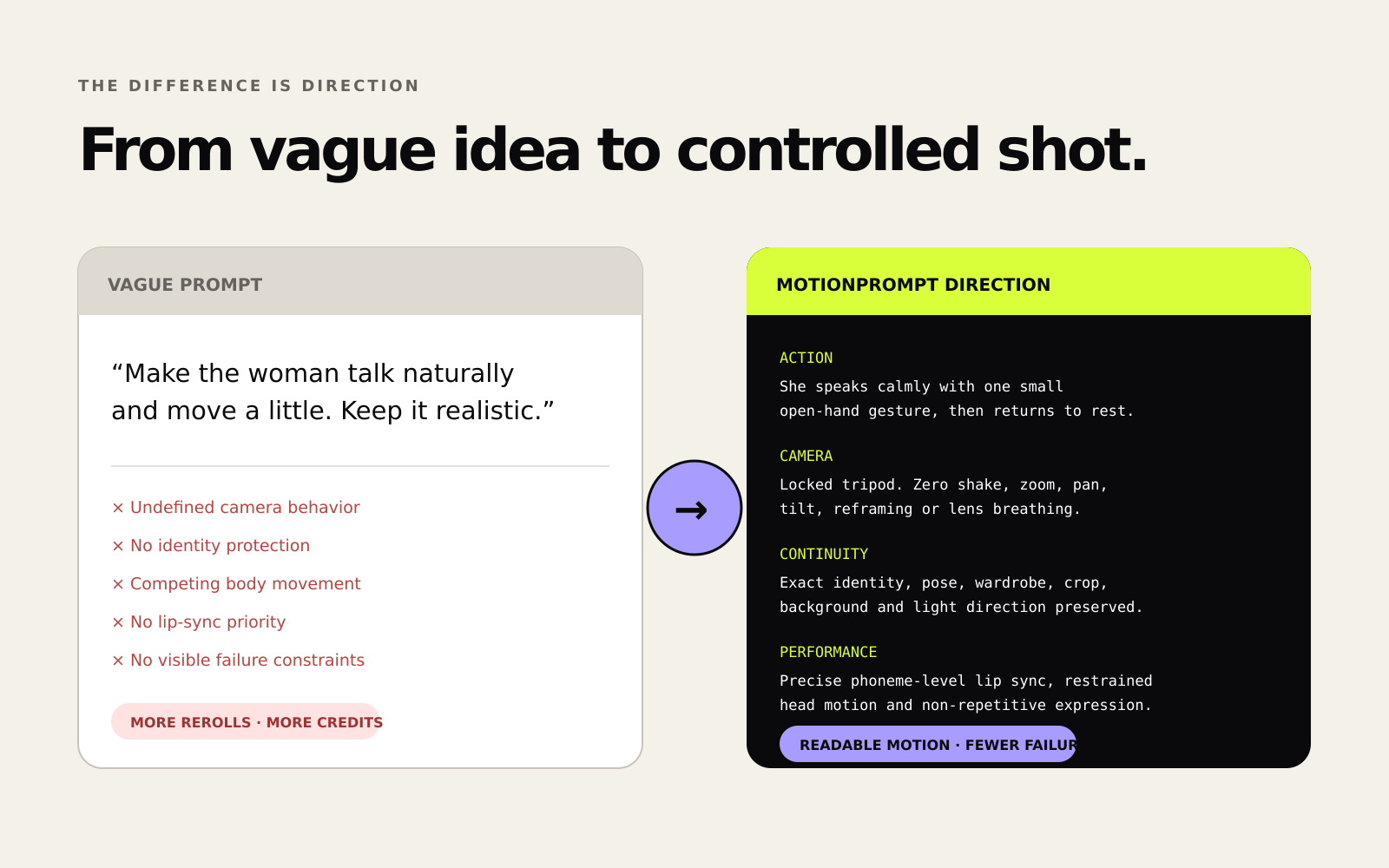
A prompt can sound cinematic and still be impossible to direct. Words such as “dynamic”, “natural”, “epic” and “realistic” describe a desired feeling, but they rarely settle the physical decisions that shape a shot.
The model still needs to resolve basic questions: Is the camera locked or moving? What exactly does the subject do? When does the action start and finish? Which details must remain unchanged? Which visible failures matter most?
A cinematic close-up of a woman holding a skincare bottle, moving naturally, beautiful light, dynamic camera, realistic, no glitches.
This sentence supplies a subject and a mood. It does not supply a testable shot. “Moving naturally” could mean a wrist turn, a head turn, walking, breathing or all of them. “Dynamic camera” could mean an orbit, handheld motion, a dolly or aggressive reframing. “No glitches” does not tell the model which objects or features must remain stable.
The six-layer preflight
1. Camera
Choose one primary camera behavior. A locked tripod, slow dolly, lateral tracking shot and handheld close-up are different production instructions. More camera verbs do not create more precision.
Useful questions: What is the shot size? Is the camera locked or moving? If moving, in which direction and at what pace? Should focus remain fixed?
2. Subject or object motion
Name one observable action. Replace “moves naturally” with a physical start state, movement and end state.
Example: “The creator rotates her wrist once until the bottle label faces the camera; head and shoulders remain still.”
3. Timing
Give the action an interval. “Slowly” is relative. “Over two seconds” creates something that can be checked against the output.
Timing is especially important when several events must happen in sequence. If the shot is short, remove secondary actions rather than compressing them into the same moment.
4. Framing and format
State aspect ratio and composition where they matter. A vertical product close-up and a horizontal cinematic medium shot create different spatial pressures.
Useful details: aspect ratio, close-up or wide shot, subject placement, headroom, product visibility and whether reframing is allowed.
5. Continuity
Continuity direction identifies what must survive every frame. For a person, that may be face identity, wardrobe and finger count. For a product, it may be geometry, cap shape, logo orientation, label text, material and scale.
Write continuity as a preservation rule rather than another style request: “Preserve bottle geometry, cap shape, label placement and logo orientation throughout.”
6. Negative direction
Negative direction works best when it names visible failure modes. “No glitches” is generic. “No camera orbit, focus breathing, hand deformation, text drift or background warping” is inspectable.
Keep the list connected to the shot. A long universal negative prompt can compete with the primary direction and make diagnosis harder after a failed test.
Put the layers together
9:16 close-up product shot. The creator holds the same skincare bottle label-forward at sternum height and rotates her wrist once over two seconds. Head, shoulders and gaze remain stable. Locked tripod camera, 85 mm lens, centered framing, no orbit or reframing. Preserve face identity, finger count, bottle geometry, cap shape, scale and logo orientation throughout. No focus breathing, hand deformation, text drift, changing object count, lighting flicker or background warping.
The structured version is not guaranteed to produce a perfect generation. No prompt can guarantee model behavior. Its advantage is diagnostic: if the output fails, you can identify which layer failed and change that layer without rewriting the entire creative intent.
Repair one failed layer at a time
A common reaction to a bad output is to make the whole prompt longer. That often hides the cause. Use a narrower loop:
- Keep what worked. If camera and framing are correct, preserve them verbatim.
- Name the visible failure. Identity drift, product mutation, camera shake and background warping require different repairs.
- Add one targeted constraint. Avoid stacking several unrelated fixes in the same iteration.
- Run a controlled test. Compare the result against the same brief rather than changing prompt and settings simultaneously.
A reusable prompt skeleton
[FORMAT + SHOT SIZE]. [SUBJECT + SETTING]. [ONE PRIMARY ACTION] over [DURATION]. [CAMERA BEHAVIOR + LENS/FRAMING]. Preserve [CONTINUITY ELEMENTS] throughout. No [SHOT-SPECIFIC FAILURE MODES].
Use the skeleton as a checklist, not a rigid grammar. Some shots need performance or lighting direction; others need precise object physics. The purpose is to expose missing decisions before the generation, not to make every prompt look identical.
Quick preflight checklist
- Does the prompt name one primary camera behavior?
- Is the subject or object action observable?
- Is timing explicit where motion matters?
- Are aspect ratio and composition stated?
- Are identity, geometry and object counts protected?
- Are negative instructions tied to visible failures?
- Do any instructions contradict each other?
- Could one secondary action be removed?
Check or build the brief
Run the free preflight—or use the complete production system.
The free checker scores the six signals locally. MotionPrompt Studio adds a structured builder, readiness scan, 18 presets, 84 scenarios and 15 targeted repair blocks.
Use the free checker Explore MotionPrompt Studio